Command Palette

Search for a command to run...

Part VIII

Cross-Product Integration Architecture

The Zoho estate holds together through eight distinct integration patterns. A consultant who can name the right pattern for each requirement — and refuse the wrong one — will ship better implementations than one who reaches for Flow by reflex.

1
Pattern 1

Native Module-to-Module Links

Same-tenant, same-product foreign keys that look like related lists.

The simplest pattern is the native in-product link: Contacts to Accounts to Deals to Quotes inside CRM; Contacts to Invoices inside Books; Tickets to Contacts in Desk. The record graph is managed by the product itself; the consultant's job is schema design and lookup-field hygiene. Performance is fast (the join happens server-side inside a single database); governance is straightforward (the permission model is a single ACL). The limitation is that this pattern does not reach across products — a Books invoice cannot be a native related list of a CRM deal without a synchroniser.
2
Pattern 2

Two-Way Native Sync

The shipped, supported, bidirectional sync between sibling products.

Zoho ships two-way native sync between specific pairs: CRM and Books, CRM and Desk, CRM and Campaigns, CRM and SalesIQ. These are not generic integrations; they are pre-built, field-mapped, configured from the admin console of both sides, and supported by Zoho itself. The pattern scales to the field-mapping Zoho has written for you and no further. When a customer asks for a new field to sync, the consultant should look first for whether a setup toggle has shipped, and only then reach for Zoho Flow or a custom webhook.

3
Pattern 3

Zoho Flow (iPaaS)

Cross-application workflows with triggers, actions, branching, and error handling.

Zoho Flow is the general-purpose integration platform of the Zoho estate. It lets the consultant compose triggers from one application, actions in another, and conditional branching in between. Flow excels at asynchronous, idempotent workflows: "when a CRM deal moves to Closed-Won, create a Books invoice, then post a message to a Cliq channel, then create a Project in Zoho Projects, then send a welcome email via Campaigns." Flow's governance properties (versioning, execution logs, error-retry, admin surface) make it the right tool for most cross-app automation, and the wrong tool for low-latency user-facing APIs.

4
Pattern 4

Deluge and the App Deluge Runtime

Zoho's shared scripting language, executed inline across CRM, Creator, Flow, and Desk.

Deluge is the script language common to CRM workflow rules, Creator forms and pages, Zoho Flow custom functions, Desk macros, and Sigma Analytics. One of Zoho's most underappreciated architectural choices was to make Deluge a shared runtime. It means a consultant's Deluge expertise transfers across products; it means the same function that validates a lead in CRM can be lifted, with minor edits, into Creator as a form validator. Deluge governance is weak by default — there is no code review, no version control native to the language — which is why a disciplined consultant ships Deluge through Creator environments or as Flow custom functions rather than writing it directly inside CRM workflow rules.

5
Pattern 5

Webhooks and REST APIs

The escape hatch to third-party systems and custom integrations.

Every Zoho product exposes a versioned REST API; CRM ships the most mature (v8 in early 2026, with v7 still supported); Books, Desk, Projects, Analytics, and Creator all ship stable APIs. Webhooks are the outbound mirror: CRM workflow rules can fire a webhook on record change, Desk can fire a webhook on ticket transition, and so on. The consultant's governance task is to decide which integrations belong in Flow (graphical, auditable) and which require direct API work (low-latency, high-volume, business-critical). A rule of thumb: if the integration needs to run more than a hundred times a day and fail loudly, write it against the API with retries and a dead-letter; if it runs a few times a day and wants an audit UI, build it in Flow.

6
Pattern 6

Zoho Catalyst (Serverless)

Application back-end platform for custom services and APIs.

Catalyst is Zoho's serverless application platform — functions, data stores, authentication, file storage, job scheduler, container hosting, and native integrations with CRM/Desk/Creator. When the consultant's requirement is a full-fledged application back-end (not a workflow automation), Catalyst is the tool: custom microservices, customer-facing portals, high-transaction APIs, AI model hosting. Governance in Catalyst is closer to what a software engineer expects (environments, logs, CI/CD-like deploys) than to what a CRM admin knows.

7
Pattern 7

Creator as Extension

Low-code apps embedded inside CRM via Creator for CRM.

Creator's embedded runtime — the Creator-for-CRM feature — is a distinctive integration pattern: a Creator form or page is embedded as a related list or tab inside a CRM record detail view, with the Creator app reading and writing CRM records via Deluge. This is how consultants solve requirements that don't fit the CRM data model without leaving the CRM UI. The governance discipline is environment promotion (Dev → Stage → Prod) and field-level auditing in the Creator application.

8
Pattern 8

Zoho MCP (2025+)

Model Context Protocol servers that let third-party AI clients call Zoho tools.

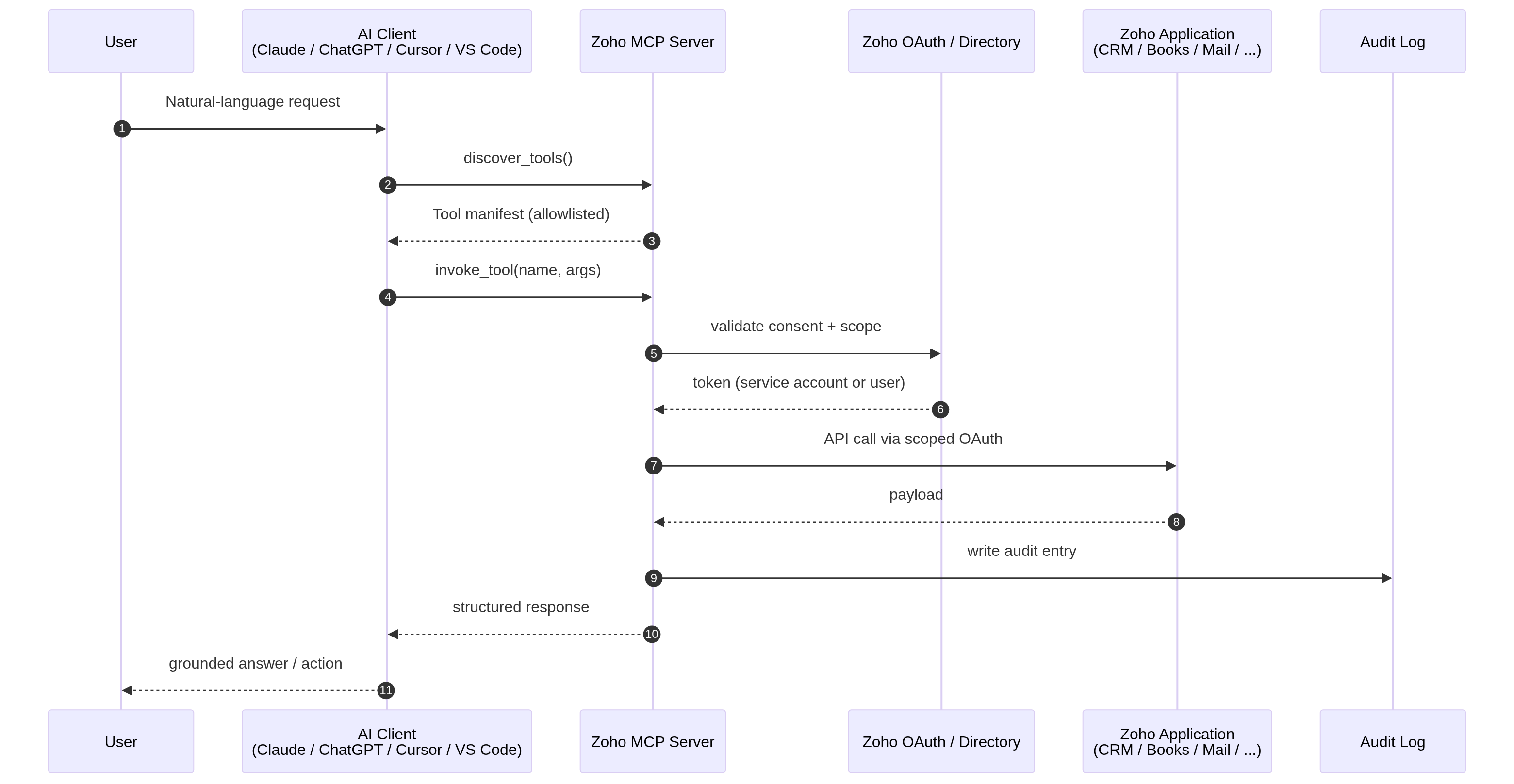
The newest pattern is MCP. Zoho operates managed MCP servers that expose curated Zoho actions as tools that any compliant AI client (Claude, ChatGPT, custom agents) can discover and invoke under an OAuth consent. The governance surface is different from everything above it — OAuth scopes, admin-allowlisted tool catalogues, service-account identity, per-request audit log, credit economics — and it is where the most interesting integration problems of the next two years will be designed.

Plates gathered from the chapters

Figure plates

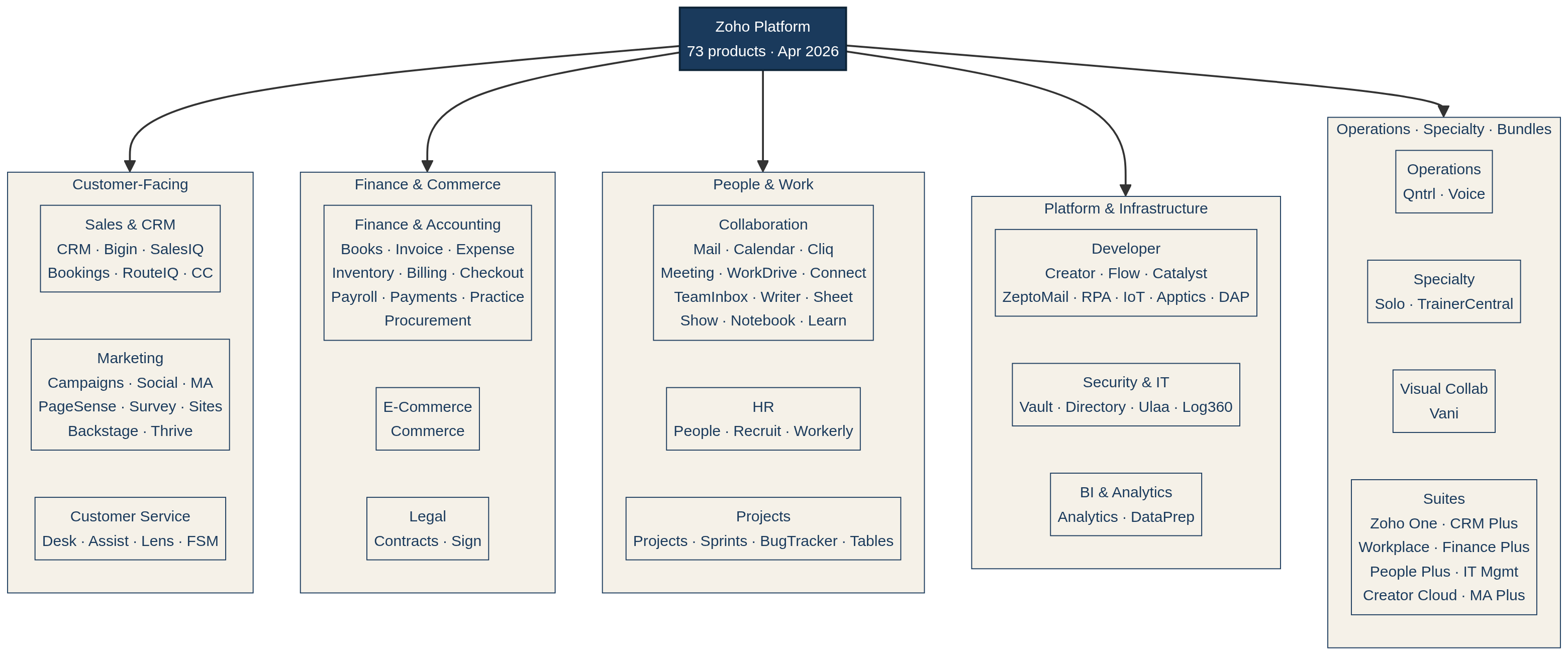
Figure 1 — The ecosystem, sixteen clusters.
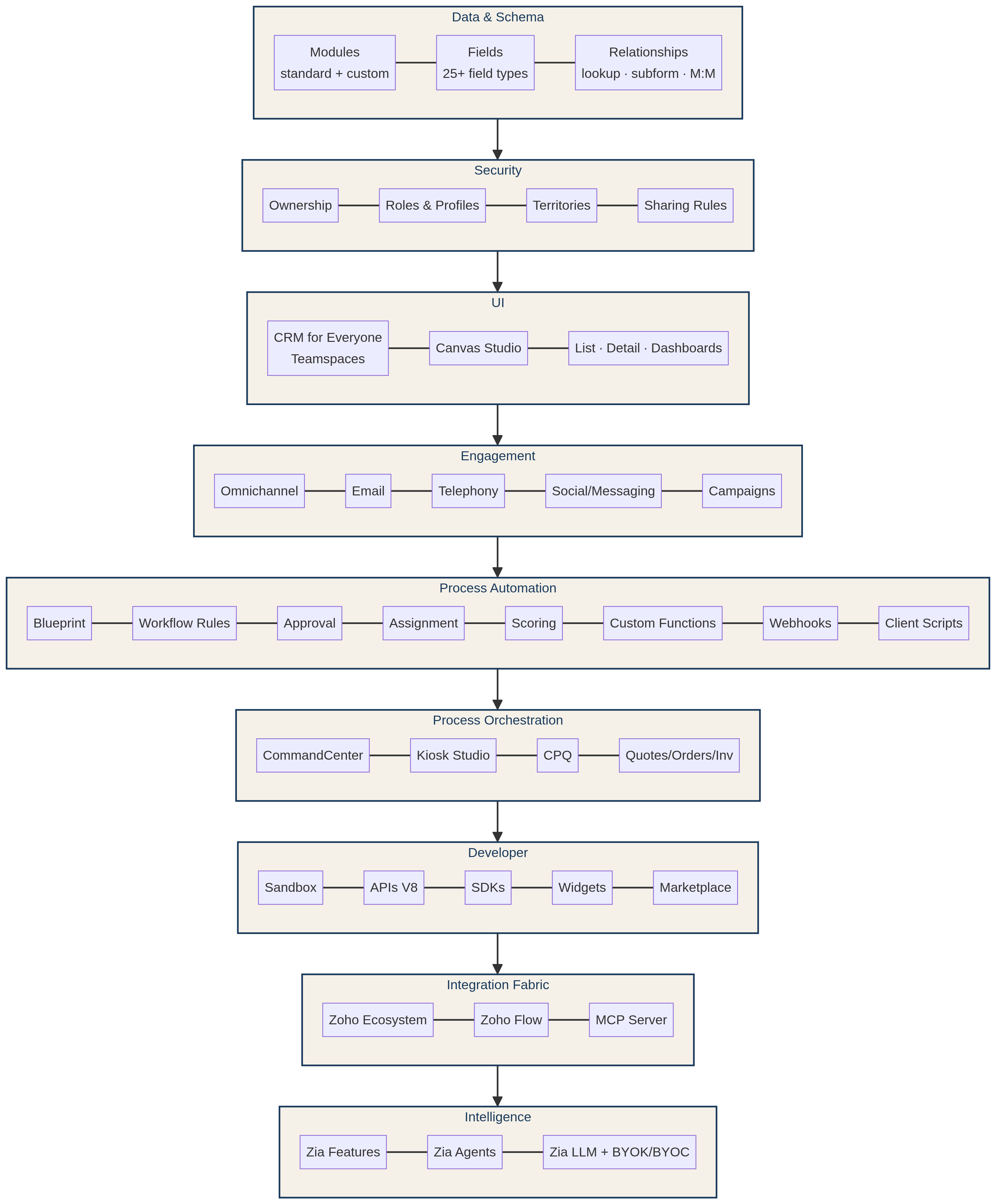
Figure 2 — The nine architectural layers of Zoho CRM.
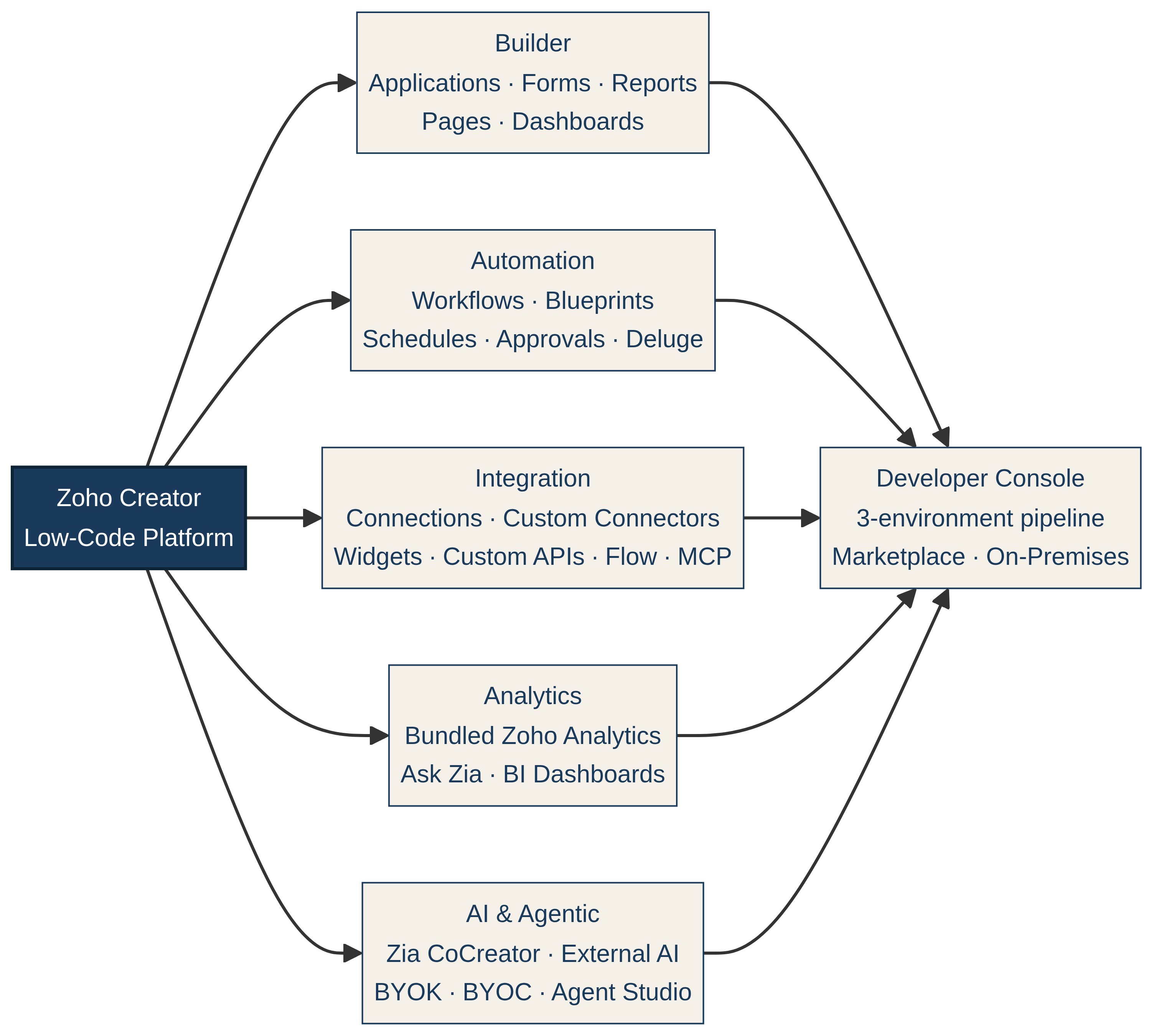
Figure 3 — Creator's five pillars.
Figure 4 — The MCP tool-invocation loop.
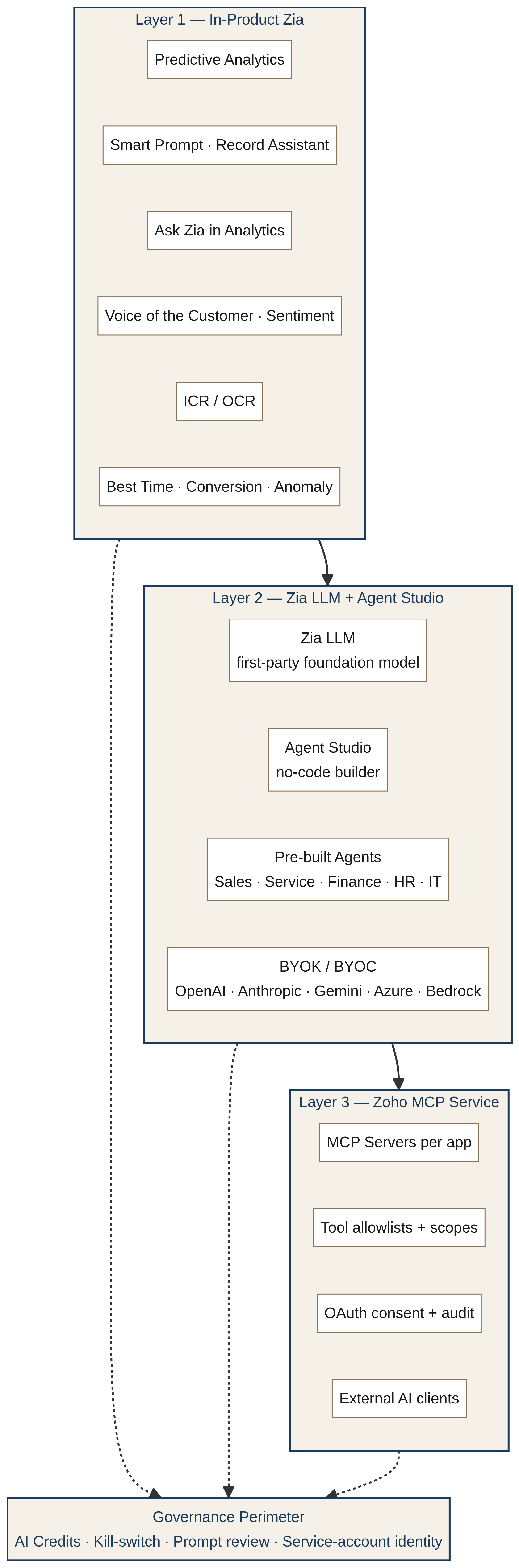
Figure 5 — The three layers of the Zia intelligence stack.
Figure 6 — The lead-to-cash playbook architecture.
Back to home